 Lirra

What to write down
The essentials, for every book: the title, the author, the date you finished it, and a rating (stars, a word, or just “loved it”).
Nice extras, if you enjoy them: the date you started, the format (paperback, ebook, audiobook), the number of pages, where the book came from, one line about how it made you feel, and a quote you want to keep.
Write down the books you did not finish too. Knowing what you put down is as useful as knowing what you loved.
The three ways, side by side
| Reading app | Paper journal | Spreadsheet | |
|---|---|---|---|
| Time per book | Seconds (barcode scan) | A few minutes | A minute |
| Statistics | Automatic | By hand | With formulas |
| Looks | Depends on the app | As beautiful as you make it | Plain |
| Your data | Check that you can export it | On paper, only one copy | Fully yours |
| Best for | Reading a lot, on the go | Slow, reflective readers | People who love numbers |
A reading app
An app is the quickest way: scan the barcode, and the title, author, cover and page count fill themselves. Statistics, goals and reminders come for free.
Before you choose one, check three things: can you export your books to a file (so you can leave one day), does it need an account, and does it show ads or track you. Lirra, our app, needs no account, shows no ads, and exports everything to a CSV file at any time.
A paper journal
A notebook is slower, and that is the point: writing a few lines after each book helps you remember it. Give each book half a page, keep an index at the front, and add a year-at-a-glance page where you color one spine per book finished.
The Bookshelf Maker turns your list into a picture of a shelf you can print and glue in.
A spreadsheet (free template)
A spreadsheet is the most flexible: sort by author, count pages per month, make your own charts. Start with these columns: Title, Author, ISBN13, Exclusive Shelf (read, currently-reading or to-read), Date Added, Date Read, My Rating (1 to 5), Number of Pages, Binding (Paperback, Kindle Edition, Audiobook…) and Private Notes.
The column names are the same as in a Goodreads export, on purpose: if you move to an app later, many apps can read the file, Lirra included. Write dates as 2027-01-31.
Habits that make it last
- Log the book the moment you finish it. A week later, you will have forgotten the date.
- Keep your to-read pile apart from your wishlist. Books you own are not books you want.
- Look back once a month. Five minutes to see what you read is what keeps the habit alive.
- Keep it light. A log you dread filling in is a log you will stop.
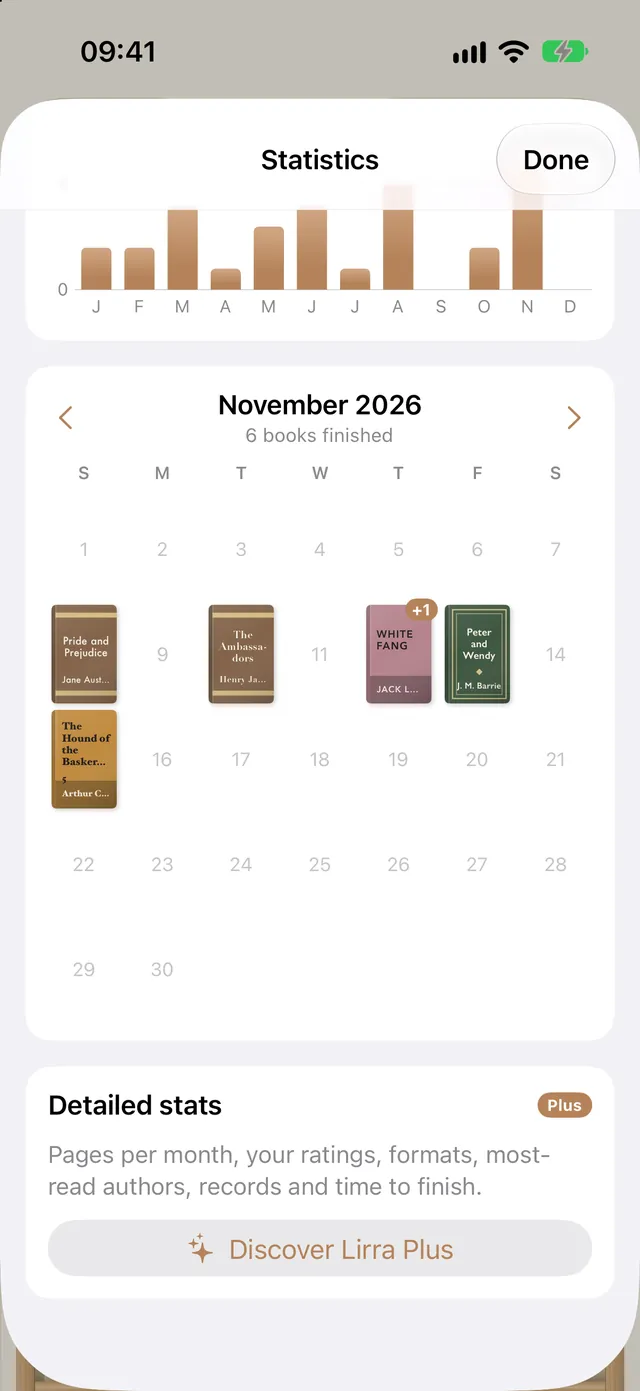
In Lirra: your year, counted for you
Every book you add stands on your shelf. Lirra counts books and pages for each month, follows your yearly goal and fills a calendar with covers. Your books stay on your iPhone and in your own iCloud.
Questions
What is the easiest way to keep track of books?
A reading app with a barcode scanner: adding a book takes a few seconds, and statistics are automatic. If you prefer paper, a simple notebook with one line per book works too.
Can I move my reading log from one app to another?
Usually, yes, through a CSV file. Goodreads and StoryGraph both export one, and Lirra can import them.
Should I track books I did not finish?
Yes. Mark them as “did not finish”, with a line on why. It helps you choose better next time.